Distributing controls
Putting all controls in one column makes plate effects (edge evaporation, temperature or dispense gradients) look like biology. Distribute controls spreads them so every row and column gets a balanced share.
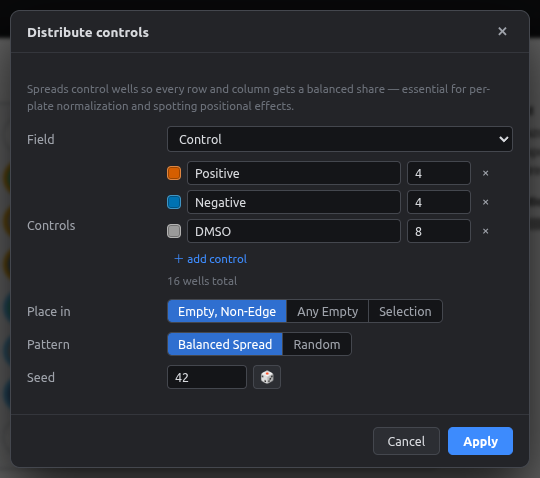
| Option | Meaning |
|---|---|
| Field | Category field to write to (default: Control) |
| Controls | Each control value and how many wells it needs. + add control for more |
| Place in | Empty, non-edge (recommended), Any empty, or the current Selection |
| Pattern | Balanced spread: even across rows/columns and far apart. Random: random placement with a seed |
| Seed | Same seed → same placement. 🎲 picks a new one |
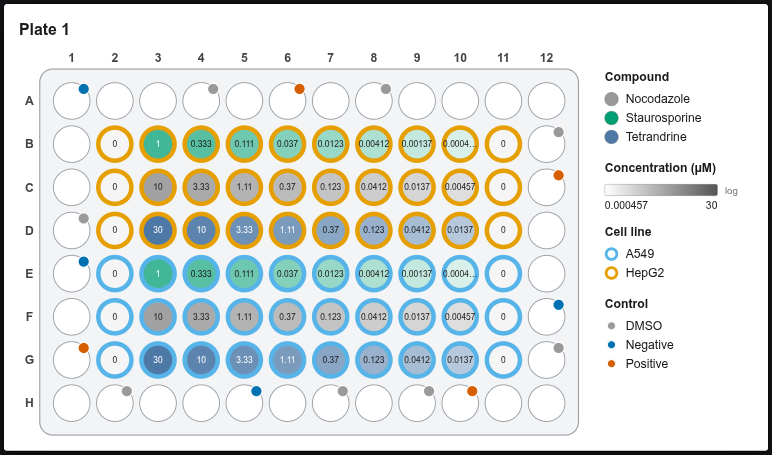
How the balanced spread works
Controls are placed one at a time, alternating between control types. Each goes in the candidate well that:
- sits in the row and column with the fewest controls so far, then
- is farthest from controls of the same type, then
- is farthest from any control.
The result is close to a Latin-square layout, which is what plate-normalization methods (per-plate z-scores, B-score, pycytominer normalize) work best with.
Tip
If there aren't enough candidate wells, the dialog tells you how many it needs. Free some wells or choose Any empty.