Platemap export (pycytominer)
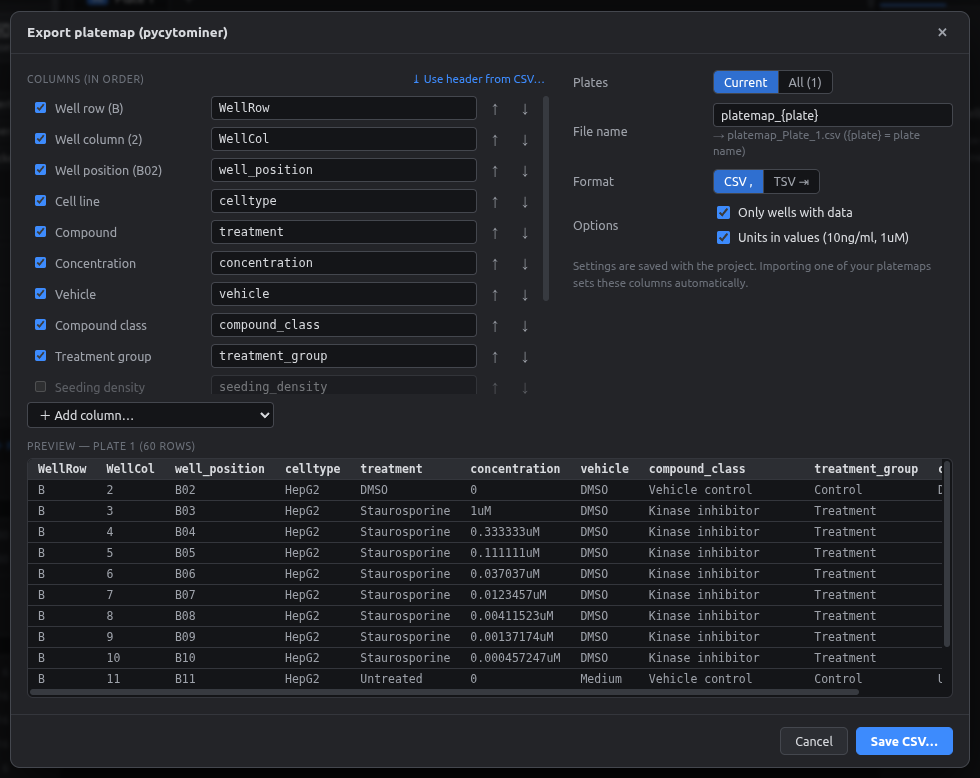
Writes the per-plate metadata files that pycytominer and CellProfiler-based Cell Painting pipelines expect, with your exact column names. Nothing needs to be edited by hand afterwards.
Open it with the Platemap CSV button, File → Export platemap (pycytominer)…, or Ctrl+Shift+E.
Output
WellRow,WellCol,well_position,celltype,treatment,concentration,vehicle,compound_class,treatment_group
B,2,B02,HepG2,DMSO,0,DMSO,Vehicle control,Control
B,3,B03,HepG2,Staurosporine,1uM,DMSO,Kinase inhibitor,Treatment
B,4,B04,HepG2,Staurosporine,0.333333uM,DMSO,Kinase inhibitor,Treatment
Assay_Plate_Barcode,Plate_Map_Name
Plate 1,platemap_Plate_1
Plate 1_rep2,platemap_Plate_1_rep2
Columns
The left side of the dialog lists every column in output order:
- ☑ includes or excludes the column.
- Header box: the exact header text. Edit it freely, e.g.
Metadata_Compound. - ↑ ↓ reorder the columns.
- + Add column… adds the extra well/plate columns:
well(B2),plate_map_name,Assay_Plate_Barcode.
| Column source | Example output |
|---|---|
| Well row | B |
| Well column | 2 |
| Well position | B02 (zero-padded column) |
| Well | B2 |
| Plate map name | platemap_NF1_plate19 |
| Plate barcode | the plate's barcode, or its name |
| Any field | its value; numbers get their unit when Units in values is on |
Copy the layout from an existing file
⤓ Use header from CSV… reads the header row of one of your existing platemaps and copies its names and order exactly. Unknown headers become new fields. New projects then remember this layout.
Options
| Option | Meaning |
|---|---|
| Plates | Current saves one file. All asks for a folder and writes every plate |
| Files (all plates) | One per plate (standard), or Combined in one file with a plate_map_name column |
| File name | Pattern; {plate} is replaced by the plate name. Default platemap_{plate} |
| Format | CSV (comma) or TSV (tab) |
| Only wells with data | Skip empty wells (the usual choice) |
| Units in values | 10ng/ml, 1uM; vehicle stays a plain 0 |
| Also write barcode_platemap | Adds barcode_platemap.csv (all plates) |
Existing files are never overwritten silently: the app lists them and asks first.
The preview at the bottom shows the first rows of the current plate exactly as they'll be written.
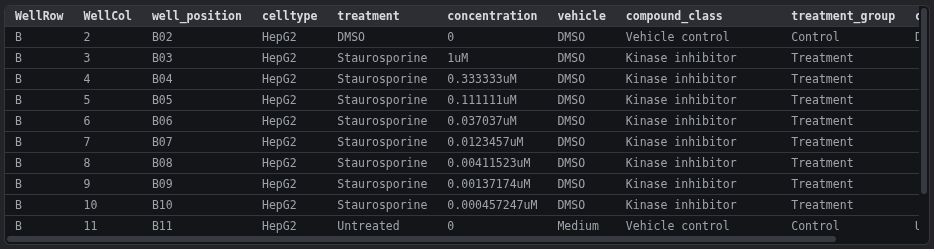
Plate barcodes
Set each plate's barcode in Plate settings (double-click the tab). It becomes Assay_Plate_Barcode and should match the barcode in your image/measurement files. Without one, the plate name is used.
Round-tripping
Importing a platemap and exporting it again gives an identical file: same columns, same order, same unit spelling. Re-editing old experiments is therefore safe. See Bringing in existing platemaps.