Colors
Every category value (each compound, cell line, control type…) has its own color. New values get a colorblind-safe color that isn't already used by another field.
Color picker
Click any color swatch in the Fields panel, the Inspector, the Layers tab or the Figure tab.
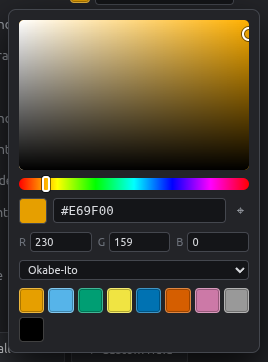
- Square: saturation and brightness. Bar: hue.
- Hex box: paste a color like
#0072B2. - R G B: exact values.
- ⌖ Eyedropper: pick any color from your screen, e.g. from a journal figure.
- Recent: the colors you used last.
- Palettes: Okabe-Ito, Tol Bright, Tol Muted, Tableau, Pastel, Bold, Set3.
Dragging in the picker updates the plate live, and the whole adjustment is a single undo step.
Recolor a whole field
In Fields & values, use Apply palette… under a category field to recolor all its values in one step.
| Palette | Good for |
|---|---|
| Okabe-Ito | Default. Safe for every type of color blindness |
| Tol Bright / Tol Muted | Publication figures, colorblind-safe |
| Tableau | Many categories (10 colors) |
| Pastel | Light fills under dark text |
| Set3 | Up to 12 categories |
Number gradients
Number fields use color ramps (Viridis, Magma, Cividis, Blues, Reds, Greys, Blue–Red) instead of fixed colors. You choose these in the Layers tab.