Installation
All installers are on the Releases page. Open it and download the file for your computer from the Assets list.
| Your computer | File to download |
|---|---|
| Windows 10/11 | PlateMap-Studio-<version>-windows-setup.exe (installs the app) or …-windows-portable.exe (runs without installing) |
| Mac with Apple chip (M1, M2, M3, M4) | PlateMap-Studio-<version>-mac-arm64.dmg |
| Mac with Intel chip | PlateMap-Studio-<version>-mac-x64.dmg |
| Ubuntu / Debian | PlateMap-Studio-<version>-linux-amd64.deb |
| Any other Linux | PlateMap-Studio-<version>-linux-x86_64.AppImage |
Which Mac do I have?
Click the Apple menu → About This Mac. If it lists an Apple M1/M2/M3/M4 chip, download arm64. If it lists an Intel processor, download x64.
Windows
- Download
…-windows-setup.exeand double-click it. - Windows may show "Windows protected your PC", because the app isn't code-signed. Click More info → Run anyway.
- Pick an install folder (the default is fine) and click Install.
- Start PlateMap Studio from the Start menu or the desktop shortcut.
No admin rights?
Use …-windows-portable.exe instead. It runs straight from your Downloads folder without installing anything.
macOS
- Download the
.dmgthat matches your chip (see above) and open it. - Drag PlateMap Studio into the Applications folder.
- Open the app from Applications. The first time, macOS blocks it because it isn't notarized by Apple:
- Click Done. Do not click Move to Trash.
- Open System Settings → Privacy & Security, scroll down, and click Open Anyway next to PlateMap Studio.
- On older macOS you can instead right-click the app → Open → Open.
- macOS remembers your choice, so from then on the app opens normally.
macOS says the app "is damaged and can't be opened"
The app isn't actually damaged; it's blocked by the "downloaded from the internet" flag. Open Terminal and run:
xattr -cr "/Applications/PlateMap Studio.app"
Then open the app again.
Linux
sudo apt install ./PlateMap-Studio-*-linux-amd64.deb
Then launch PlateMap Studio from your applications menu. This is the recommended option on Ubuntu 24.04 and newer.
chmod +x PlateMap-Studio-*-linux-x86_64.AppImage
./PlateMap-Studio-*-linux-x86_64.AppImage
AppImages need libfuse2 (sudo apt install libfuse2). On Ubuntu 24.04 and newer, add --no-sandbox or use the .deb instead.
First launch
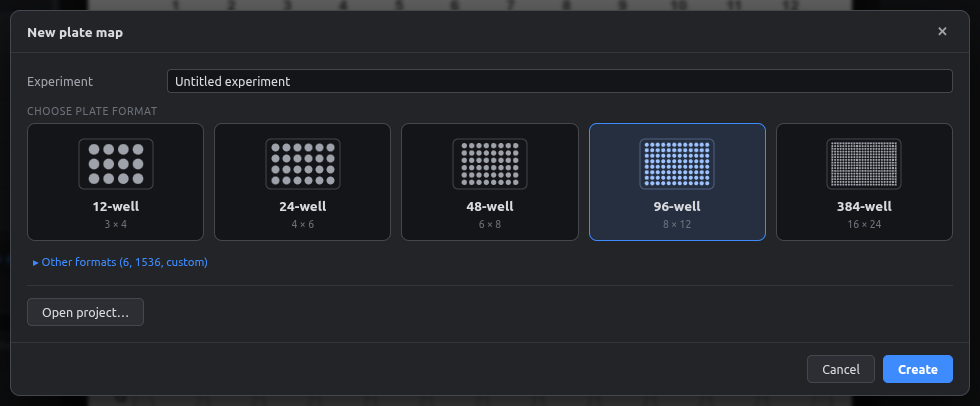
The app opens on the New plate map screen, where you pick the plate format:
Continue with Your first plate map.
Build from source (developers)
You need Node.js 20 or newer.
git clone https://github.com/LIVR-VUB/Platemap-studio.git
cd Platemap-studio
npm install
npm start            # build and open the app
npm run dev          # development mode with hot reload
npm run dist         # build installers for the current OS into release/