Fields
A field is one piece of information about a well: its cell line, compound, concentration, and so on. Each field becomes a column in the exports.
Built-in fields
| Field | Type | Platemap column | Notes |
|---|---|---|---|
| Cell line | category | celltype |
|
| Compound | category | treatment |
|
| Concentration | number (µM default) | concentration |
per-well units |
| Vehicle | category | vehicle |
auto-fills from Compound |
| Compound class | text | compound_class |
auto-fills from Compound |
| Treatment group | category | treatment_group |
auto-fills from Compound |
| Seeding density | number (cells/well) | seeding_density |
|
| Timepoint | number (h) | timepoint |
|
| Control | category | control_type |
Positive / Negative / DMSO / Untreated / Empty |
| Replicate | text | replicate |
|
| Notes | text | notes |
Field types
| Type | Use it for | Example |
|---|---|---|
| category | Named values with a color each | compound, cell line, stain panel |
| number | Numbers with a unit; can be shown as a color gradient | concentration, density, timepoint |
| text | Free text without colors | notes, IDs, compound class |
| bool | Yes/no flags | excluded, transfected |
Adding a custom field
Click + Field in the left panel, + Custom field in the Inspector, or Tools → New custom field….
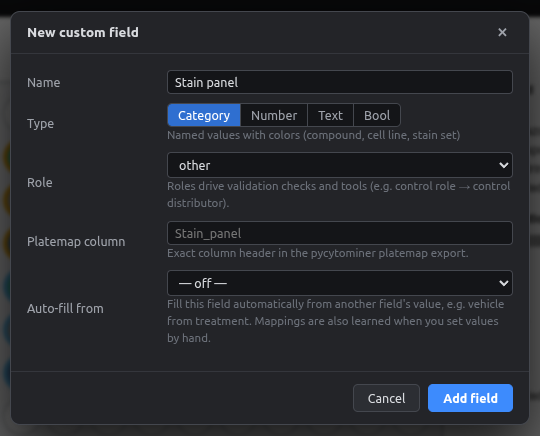
- Name: as shown in the app.
- Type: see the table above.
- Default unit (numbers only): pick from the dropdown or type your own. See Units.
- Role: tells the app what the field means, which drives the checks and tools. For example, the control role marks which wells are controls.
- Platemap column: the exact column header in the pycytominer export.
- Auto-fill from: fill this field automatically from another one. See Auto-fill fields.
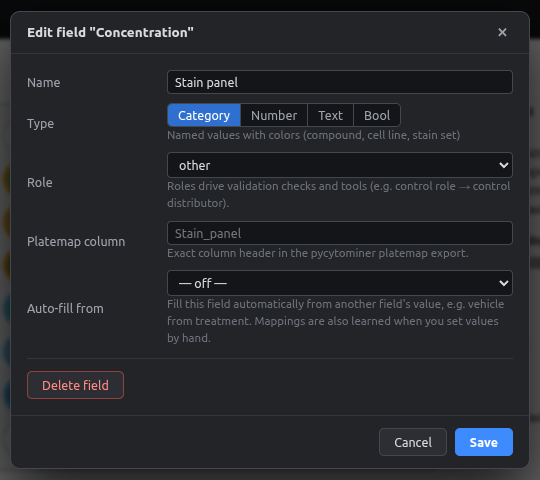
Editing and deleting fields
Click ⚙ next to a field in Fields & values to change its name, type, unit, role, export column or auto-fill. Delete field removes the field and all its values, and can be undone.
- Changing the type: existing values are converted where possible (e.g.
"10"→10). - Changing the default unit: existing numbers keep their meaning. See Units.
Values in the Fields panel
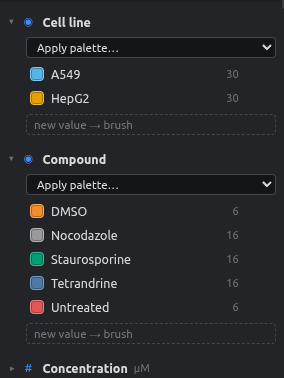
- Click a value to select its wells on the current plate.
- Double-click to rename it everywhere. For numbers this can also change the unit, e.g.
10 µM→10 nM. - 🖌 paints with that value.
- The swatch changes its color.
- Apply palette… recolors all values of the field at once.
- The number on the right counts wells on the current plate.
- ↑ moves a field up. Field order is also the default column order in exports.